SUMMARY: The chapter on Operating System in Class 11 Computer Science introduces students to the fundamental concepts and functions of operating systems in computing environments. KEY TOPICS: functions of operating systems, types of operating systems, process management, memory management, file management, device management, user interface, security and protection, examples of operating systems, multitasking and multiprocessing
Differentiate between time-sharing and real-time operating systems.
Q183 Marks
What is multitasking? Give one example of a multitasking OS.
Q193 Marks
Explain the difference between a process and a program.
Q203 Marks
What is a file system? Mention any two file systems.
Q213 Marks
What are the main types of operating systems? Provide a brief description of each type.
View sample solutionHide solution
The main types of operating systems include batch operating systems, time-sharing operating systems, distributed operating systems, network operating systems, and real-time operating systems. Batch OS processes jobs in batches without user interaction, time-sharing OS allows multiple users to interact simultaneously, distributed OS manages a group of independent computers, network OS provides services to computers connected in a network, and real-time OS responds to inputs instantly for time-sensitive tasks.
Q223 Marks
Define process management in the context of operating systems. Why is it important?
View sample solutionHide solution
Process management refers to the handling of processes in a system, which includes process scheduling, creation, termination, and synchronization. It is important because it ensures efficient execution of processes, optimizes CPU usage, and maintains system stability by managing resources effectively.
Q233 Marks
What is memory management and what are its key responsibilities in an operating system?
View sample solutionHide solution
Memory management is the process of controlling and coordinating computer memory, including the allocation and deallocation of memory spaces as needed by processes. Its key responsibilities include keeping track of each byte in a computer's memory, managing the allocation of memory to processes, and ensuring that processes do not interfere with each other's memory space.
Q243 Marks
Explain the term 'device management' in operating systems. How does it benefit users?
View sample solutionHide solution
Device management involves controlling and coordinating the various hardware devices connected to the computer, such as printers, disks, and displays. It benefits users by providing a consistent interface for device interaction, managing device communication, and ensuring that devices are used efficiently and without conflicts.
Q253 Marks
What is a user interface in an operating system? Name two types of user interfaces.
View sample solutionHide solution
A user interface in an operating system is the means by which users interact with the computer and its software. Two types of user interfaces are Command Line Interface (CLI), which allows users to type commands, and Graphical User Interface (GUI), which allows users to interact through graphical elements like windows and icons.
Long Answer Questions6 questions
Q266 Marks
Describe the major functions of an operating system in detail.
Q276 Marks
Compare different types of operating systems — batch time-sharing real-time and distributed.
Q286 Marks
Explain process management in an operating system including process states and process control block.
Q296 Marks
Discuss memory management techniques used by operating systems — paging segmentation and virtual memory.
Q306 Marks
Explain the role of system calls in an operating system with examples.
Q316 Marks
Compare single-user and multi-user operating systems with the help of a table.
Assertion–Reason Questions8 questions
Q321 Mark
Assertion (A): Operating system acts as an interface between user and hardware.
Reason (R): It hides the complexity of hardware from the user.
Show explanationHide explanation
Correct answer: Option 1 —
Both A and R are true, and R is the correct explanation of A.
Q331 Mark
Assertion (A): Linux is an open-source operating system.
Reason (R): Its source code is freely available and can be modified.
Show explanationHide explanation
Correct answer: Option 1 —
Both A and R are true, and R is the correct explanation of A.
Q341 Mark
Assertion (A): A multi-user OS allows multiple users to access the system simultaneously.
Reason (R): Each user gets a separate environment.
Show explanationHide explanation
Correct answer: Option 1 —
Both A and R are true, and R is the correct explanation of A.
Reason (R): Parts of programs are kept on disk and loaded into RAM as needed.
Show explanationHide explanation
Correct answer: Option 1 —
Both A and R are true, and R is the correct explanation of A.
Q361 Mark
Assertion (A): Time-sharing operating systems give each user a small slice of CPU time.
Reason (R): This creates the illusion that each user has their own machine.
Show explanationHide explanation
Correct answer: Option 1 —
Both A and R are true, and R is the correct explanation of A.
Q371 Mark
Assertion (A): The primary function of an operating system is to manage hardware resources.
Reason (R): Operating systems provide a user interface for users to interact with the hardware.
Show explanationHide explanation
Correct answer: Option 1 —
Both A and R are true, and R is the correct explanation of A.
Q381 Mark
Assertion (A): File management in an operating system includes the organization, storage, retrieval, naming, sharing, and protection of files.
Reason (R): File management is only concerned with the storage of files on disk.
Show explanationHide explanation
Correct answer: Option 3 —
A is true, but R is false.
Q391 Mark
Assertion (A): In a multitasking operating system, multiple processes can be executed simultaneously.
Reason (R): Multitasking allows the CPU to switch between processes quickly, giving the illusion of simultaneous execution.
Show explanationHide explanation
Correct answer: Option 1 —
Both A and R are true, and R is the correct explanation of A.
Statement-Based Questions8 questions
Q401 Mark
Statement 1: An operating system manages all hardware and software resources.
Statement 2: It also provides services to application programs.
Show answerHide answer
Correct answer: Option 1 —
Both statements are true.
Q411 Mark
Statement 1: Process states include new ready running waiting and terminated.
Statement 2: A process moves through these states during its lifetime.
Show answerHide answer
Correct answer: Option 1 —
Both statements are true.
Q421 Mark
Statement 1: A device driver is a program that controls a hardware device.
Statement 2: Each hardware device has its own device driver.
Show answerHide answer
Correct answer: Option 1 —
Both statements are true.
Q431 Mark
Statement 1: GUI uses windows icons and menus.
Statement 2: CLI uses commands typed by the user.
Show answerHide answer
Correct answer: Option 1 —
Both statements are true.
Q441 Mark
Statement 1: Round Robin scheduling gives each process a fixed time slice.
Statement 2: If a process is not finished it goes back to the queue.
Show answerHide answer
Correct answer: Option 1 —
Both statements are true.
Q451 Mark
Statement 1: The main function of an operating system is to provide a user interface for interaction.
Statement 2: Operating systems do not manage memory allocation for applications.
Show answerHide answer
Correct answer: Option 2 —
Only Statement 1 is true.
Q461 Mark
Statement 1: Multitasking allows multiple processes to run simultaneously on a single CPU.
Statement 2: Multiprocessing involves multiple CPUs working on different processes at the same time.
Show answerHide answer
Correct answer: Option 1 —
Both statements are true.
Q471 Mark
Statement 1: File management in an operating system includes organizing files into directories.
Statement 2: An operating system cannot protect files from unauthorized access.
Show answerHide answer
Correct answer: Option 3 —
Only Statement 2 is true.
Case Study / Passage Questions1 question
Q483 Marks
A small office of 10 employees needs to choose an operating system for its desktops and a shared file server. The IT manager considers Windows 11 (commercial) Linux (open source) and macOS. Each option has different licensing costs hardware compatibility and learning curves.
Which of the following is open source?
AWindows
BmacOS
CLinux
DiOS
Which OS typically has the lowest licensing cost?
AWindows
BLinux
CmacOS
DAll
Recommend an operating system for the small office and justify your choice.
Show answersHide answers
1. Option 3 — Linux
2. Option 2 — Linux
3. For a small office Linux is attractive due to zero licensing cost wide hardware compatibility and strong server features. However employees may need training. Windows 11 is the safest choice for compatibility with common business software (MS Office Tally) and ease of use but has per-seat licensing. macOS works well for creative teams but requires Apple hardware. The IT manager should weigh cost against staff comfort and software ecosystem.
Table-Based Questions3 questions
Q496 Marks
Match each operating system with its category and an example.
OS Type
Description
Example
Single-user single-task
?
MS-DOS
Single-user multitasking
?
Windows
Multi-user
?
?
Real-time
?
?
Q505 Marks
For each scenario identify what type of OS would be most appropriate.
Scenario
OS type
Personal laptop
?
University server
?
Industrial robot
?
Smartphone
?
Network of servers
?
Q513 Marks
Study the comparison table of common operating systems and answer:
OS
Type
Source
Typical use
Windows
Single-user multitasking
Proprietary
Desktop / business
Linux
Multi-user multitasking
Open source
Server / desktop / embedded
macOS
Single-user multitasking
Proprietary
Apple desktops
Android
Mobile
Open source (kernel)
Smartphones / tablets
iOS
Mobile
Proprietary
iPhone / iPad
Which OS is open source?
AWindows
BmacOS
CLinux
DiOS
Which OS is most commonly used in servers?
ALinux
BWindows
CAndroid
DiOS
Compare desktop and mobile operating systems with examples and key differences.
Show answersHide answers
1. Option 3 — Linux
2. Option 1 — Linux
3. Operating systems are classified by the number of users they support (single-user vs multi-user) the number of tasks (single-task vs multitasking) and the device they run on (desktop vs mobile vs embedded vs real-time). Linux dominates servers due to its stability open source nature and wide community support. Windows leads desktop. Android leads mobile.
Picture-Based Questions4 questions
Q523 Marks
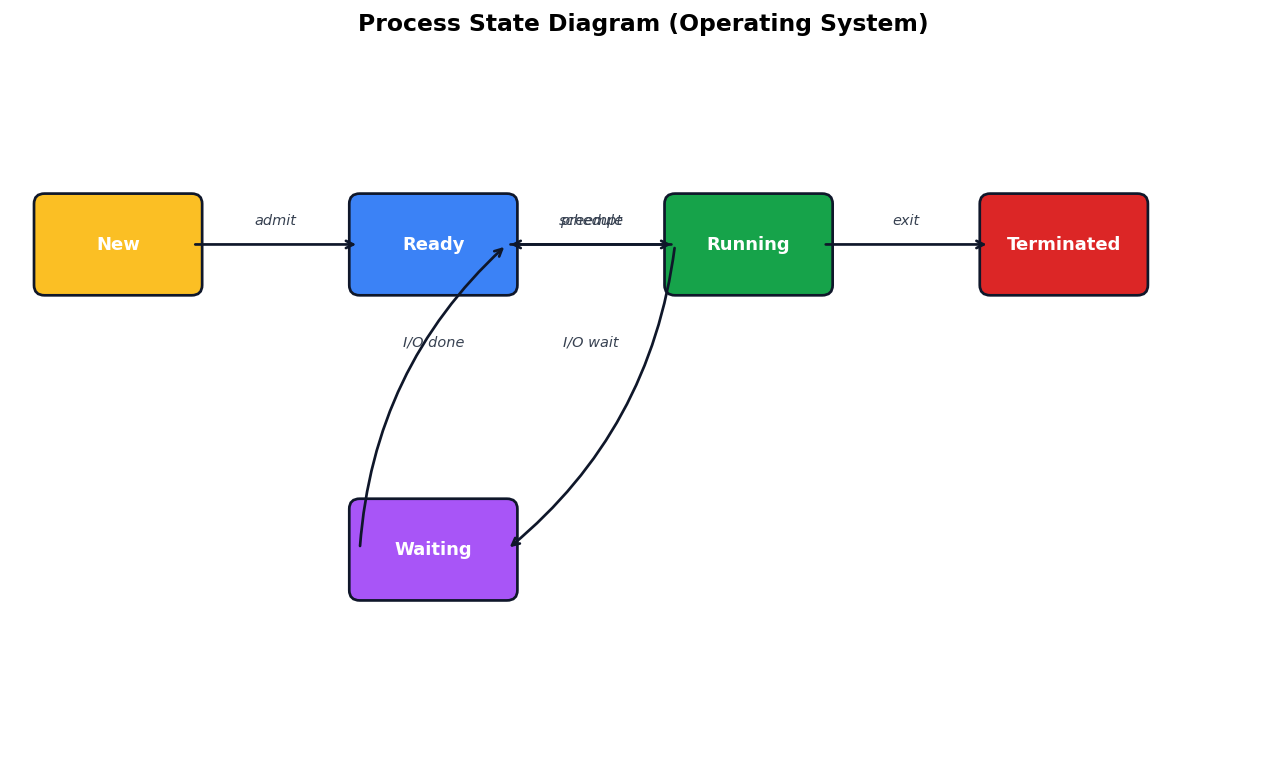
Study the process state diagram and answer:
In which state does a process actually execute on the CPU?
ANew
BReady
CRunning
DTerminated
A process moves to which state when it requests I/O?
AReady
BRunning
CWaiting
DTerminated
Explain process states and transitions in an operating system.
Show answersHide answers
1. Option 3 — Running
2. Option 3 — Waiting
3. A process moves through five states. New - just created. Ready - waiting for CPU. Running - actually executing. Waiting (Blocked) - waiting for I/O or event. Terminated - finished. Transitions are managed by the OS scheduler. Only one process is Running at a time per CPU; others are Ready.
Q533 Marks
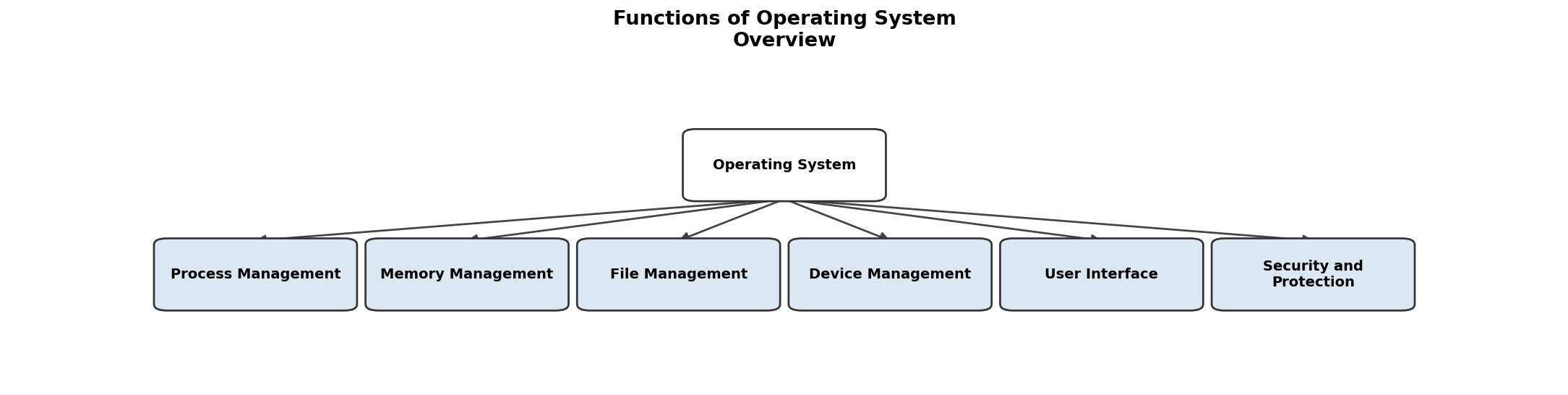
Based on the given flowchart, answer the following:
Which function is NOT part of the operating system?
AProcess Management
BNetwork Management
CFile Management
DDevice Management
List all functions of an operating system as shown in the flowchart.
How many main functions of an operating system are illustrated in the flowchart?
A4
B5
C6
D7
Which memory management technique divides memory into fixed-size blocks?
AContiguous Allocation
BPaging
CSegmentation
DVirtual Memory
Name one advantage of using Virtual Memory.
How many memory management techniques are illustrated in the flowchart?
A2
B3
C4
D5
Show answersHide answers
1. Option 2 — Network Management
2. Process Management, Memory Management, File Management, Device Management, User Interface, Security and Protection
3. Option 3 — 6
4. Option 2 — Paging
5. It allows the execution of processes that may not be completely in memory.
6. Option 3 — 4
Q543 Marks
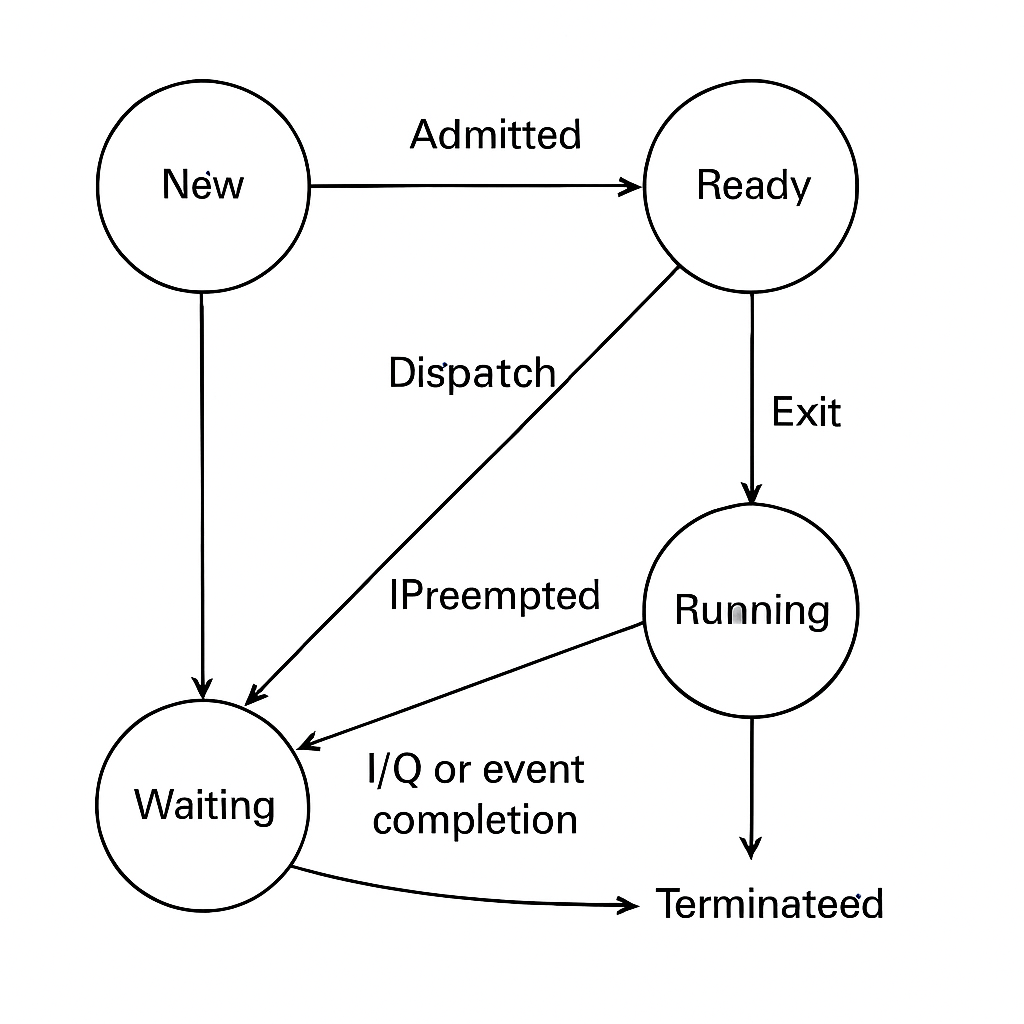
Based on the given diagram of process states, answer the following:
What does the 'Running' state indicate?
Which state does a process enter after it is created?
AReady
BRunning
CWaiting
DNew
Identify the transition that occurs when a process is moved from Waiting to Running.
ADispatch
BCompletion
CAdmission
DWakeup
Show answersHide answers
1. The process is currently being executed by the CPU.
2. Option 4 — New
3. Option 4 — Wakeup
Q553 Marks
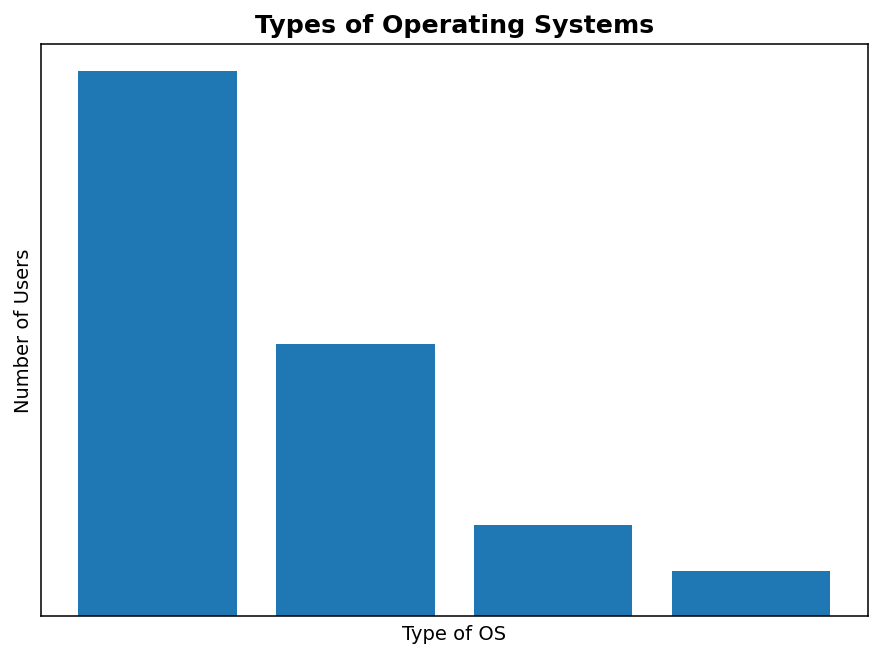
Based on the given chart, answer the following:
Which type of operating system has the highest number of users?
ASingle-user
BMulti-user
CDistributed
DReal-time
What is the total number of users for Multi-user and Distributed operating systems combined?
What percentage of users are using Real-time operating systems?