SUMMARY: This chapter provides an overview of computer systems, including their components and functions. KEY TOPICS: hardware, software, input devices, output devices, storage devices, central processing unit (CPU), operating systems, system software, application software, computer networks
The component that converts digital signals to analog signals for transmission is:
ARouter
BModem
CSwitch
DHub
Check answerHide answer
Correct answer: Option 2 — Modem
Q41 Mark
Cache memory is:
ASlower than RAM
BFaster than RAM
CSame as ROM
DLocated on hard disk
Check answerHide answer
Correct answer: Option 2 — Faster than RAM
Q51 Mark
Which device provides the user with both input and output capability?
AKeyboard
BMouse
CTouchscreen
DPrinter
Check answerHide answer
Correct answer: Option 3 — Touchscreen
Short Answer Questions10 questions
Q63 Marks
Differentiate between RAM and ROM with two points each.
Q73 Marks
Define hardware and software with one example each.
Q83 Marks
What are the main functions of the CPU?
Q93 Marks
Explain the difference between primary and secondary storage with two examples each.
Q103 Marks
List any three input devices and three output devices.
Q113 Marks
What is the role of the operating system in a computer system?
View sample solutionHide solution
The operating system (OS) manages hardware resources and provides a user interface for interaction. It acts as an intermediary between users and the computer hardware, facilitating tasks such as file management, memory management, and process scheduling.
Q123 Marks
Name two types of system software and explain their functions.
View sample solutionHide solution
Two types of system software are device drivers and utility programs. Device drivers allow the operating system to communicate with hardware devices, while utility programs perform maintenance tasks such as disk cleanup and antivirus scanning.
Q133 Marks
What are the characteristics of application software? Provide two examples.
View sample solutionHide solution
Application software is designed to help users perform specific tasks, such as word processing or spreadsheet calculations. Examples include Microsoft Word for document creation and Adobe Photoshop for image editing.
Q143 Marks
Explain the function of storage devices in a computer system.
View sample solutionHide solution
Storage devices are used to store data and programs permanently or temporarily. They allow for data retrieval and storage, with examples including hard drives for long-term storage and USB flash drives for portable data transfer.
Q153 Marks
What is the difference between system software and application software?
View sample solutionHide solution
System software is designed to manage and control computer hardware, while application software is designed to help users perform specific tasks. Examples include operating systems as system software and word processors as application software.
Long Answer Questions6 questions
Q166 Marks
Describe the basic components of a computer system with a labelled block diagram.
Q176 Marks
Explain the memory hierarchy in a computer system from registers to secondary storage.
Q186 Marks
Discuss the different types of software with examples — system software application software and utility software.
Q196 Marks
Compare CISC and RISC architectures of microprocessors.
Q206 Marks
Explain the role of bus in a computer system. Distinguish between data bus address bus and control bus.
Q216 Marks
Differentiate between RAM and ROM in tabular form on five features.
Assertion–Reason Questions8 questions
Q221 Mark
Assertion (A): Cache memory is faster than main memory.
Reason (R): It is built using SRAM and is located closer to the CPU.
Show explanationHide explanation
Correct answer: Option 1 —
Both A and R are true, and R is the correct explanation of A.
Q231 Mark
Assertion (A): SSDs are faster than HDDs.
Reason (R): SSDs have no moving mechanical parts.
Show explanationHide explanation
Correct answer: Option 1 —
Both A and R are true, and R is the correct explanation of A.
Q241 Mark
Assertion (A): RAM is volatile memory.
Reason (R): Its contents are lost when the power is switched off.
Show explanationHide explanation
Correct answer: Option 1 —
Both A and R are true, and R is the correct explanation of A.
Q251 Mark
Assertion (A): A compiler translates the entire program before execution.
Reason (R): An interpreter translates and executes a program line by line.
Show explanationHide explanation
Correct answer: Option 1 —
Both A and R are true, and R is the correct explanation of A.
Q261 Mark
Assertion (A): The CPU executes instructions in a cycle.
Reason (R): Each cycle has fetch decode execute and writeback phases.
Show explanationHide explanation
Correct answer: Option 1 —
Both A and R are true, and R is the correct explanation of A.
Q271 Mark
Assertion (A): The operating system manages hardware resources in a computer system.
Reason (R): The operating system acts as an intermediary between users and the computer hardware.
Show explanationHide explanation
Correct answer: Option 1 —
Both A and R are true, and R is the correct explanation of A.
Q281 Mark
Assertion (A): Input devices are used to display information to the user.
Reason (R): Output devices are responsible for presenting data to the user.
Show explanationHide explanation
Correct answer: Option 3 —
A is true, but R is false.
Q291 Mark
Assertion (A): Application software is designed to perform specific tasks for users.
Reason (R): System software provides a platform for running application software.
Show explanationHide explanation
Correct answer: Option 1 —
Both A and R are true, and R is the correct explanation of A.
Statement-Based Questions8 questions
Q301 Mark
Statement 1: Hardware refers to the physical parts of a computer.
Statement 2: Software refers to the programs that run on hardware.
Show answerHide answer
Correct answer: Option 1 —
Both statements are true.
Q311 Mark
Statement 1: A bit is the smallest unit of information.
Statement 2: A byte consists of 8 bits.
Show answerHide answer
Correct answer: Option 1 —
Both statements are true.
Q321 Mark
Statement 1: Cache memory bridges the speed gap between CPU and main memory.
Statement 2: L1 cache is the fastest among L1 L2 and L3.
Show answerHide answer
Correct answer: Option 1 —
Both statements are true.
Q331 Mark
Statement 1: An operating system manages hardware and software resources.
Statement 2: Examples include Windows Linux and macOS.
Show answerHide answer
Correct answer: Option 1 —
Both statements are true.
Q341 Mark
Statement 1: A modem stands for modulator-demodulator.
Statement 2: It is used to connect a computer to the internet over a telephone line.
Show answerHide answer
Correct answer: Option 1 —
Both statements are true.
Q351 Mark
Statement 1: The CPU is responsible for executing instructions and processing data.
Statement 2: Software refers to the physical components of a computer system.
Show answerHide answer
Correct answer: Option 2 —
Only Statement 1 is true.
Q361 Mark
Statement 1: Input devices are used to enter data into a computer system.
Statement 2: Output devices display or produce results from the computer's processes.
Show answerHide answer
Correct answer: Option 1 —
Both statements are true.
Q371 Mark
Statement 1: System software includes the operating system and utility programs.
Statement 2: Application software is designed to perform specific tasks for users.
Show answerHide answer
Correct answer: Option 1 —
Both statements are true.
Case Study / Passage Questions1 question
Q383 Marks
A student is buying a new laptop for college. The shop offers two models. Model A has 8 GB RAM 256 GB SSD and an Intel i5 processor. Model B has 16 GB RAM 512 GB SSD and an Intel i7 processor at 25 percent higher cost. The student plans to run programming tools an IDE a browser and occasional video editing.
Which model is more suitable for video editing and heavy multitasking?
AModel A
BModel B
CBoth equal
DCannot decide
Which factor most directly affects the number of programs that can be open simultaneously without slowdown?
ARAM
BSSD
CCPU
DAll of them
Justify which model the student should buy and explain why each spec matters.
Show answersHide answers
1. Option 2 — Model B
2. Option 1 — RAM
3. Model B is the better choice for sustained heavy work because more RAM (16 GB) lets the OS keep more programs in memory without swapping to disk a faster CPU (i7) speeds up CPU-bound tasks like video encoding and a larger SSD (512 GB) stores larger projects. Model A is sufficient for light coursework but may struggle with simultaneous heavy applications. The 25 percent higher cost is justified for a 4-year college lifecycle.
Table-Based Questions3 questions
Q396 Marks
Identify the type of memory and one feature for each example.
Memory
Type
Volatile?
RAM
?
Yes
ROM
?
No
Cache
?
?
Hard disk
Secondary
?
SSD
?
?
Q405 Marks
For each application identify the input and output devices used.
Application
Input device(s)
Output device(s)
Drawing on tablet
?
?
Typing a document
?
?
Voice search
?
?
Playing video game
?
?
ATM transaction
?
?
Q413 Marks
Study the table comparing common storage devices and answer:
Device
Type
Volatility
Typical capacity
Register
On-CPU
Volatile
Few bytes
Cache
On-CPU SRAM
Volatile
KBs to MBs
RAM
Main memory DRAM
Volatile
8-32 GB
SSD
Secondary
Non-volatile
256 GB - 2 TB
HDD
Secondary
Non-volatile
500 GB - 8 TB
The fastest storage in the table is:
ARegister
BCache
CRAM
DSSD
The volatile main memory of a computer is:
ARAM
BSSD
CHDD
DCache
Explain the memory hierarchy with reference to speed cost and volatility.
Show answersHide answers
1. Option 1 — Register
2. Option 1 — RAM
3. Memory hierarchy goes from fastest and smallest at the top (registers cache RAM) to slowest and largest at the bottom (SSD HDD tape). Volatile memories (registers cache RAM) lose their content when power is off; non-volatile (SSD HDD optical) retain it. Cost per byte decreases as we move down the hierarchy.
Picture-Based Questions1 question
Q423 Marks
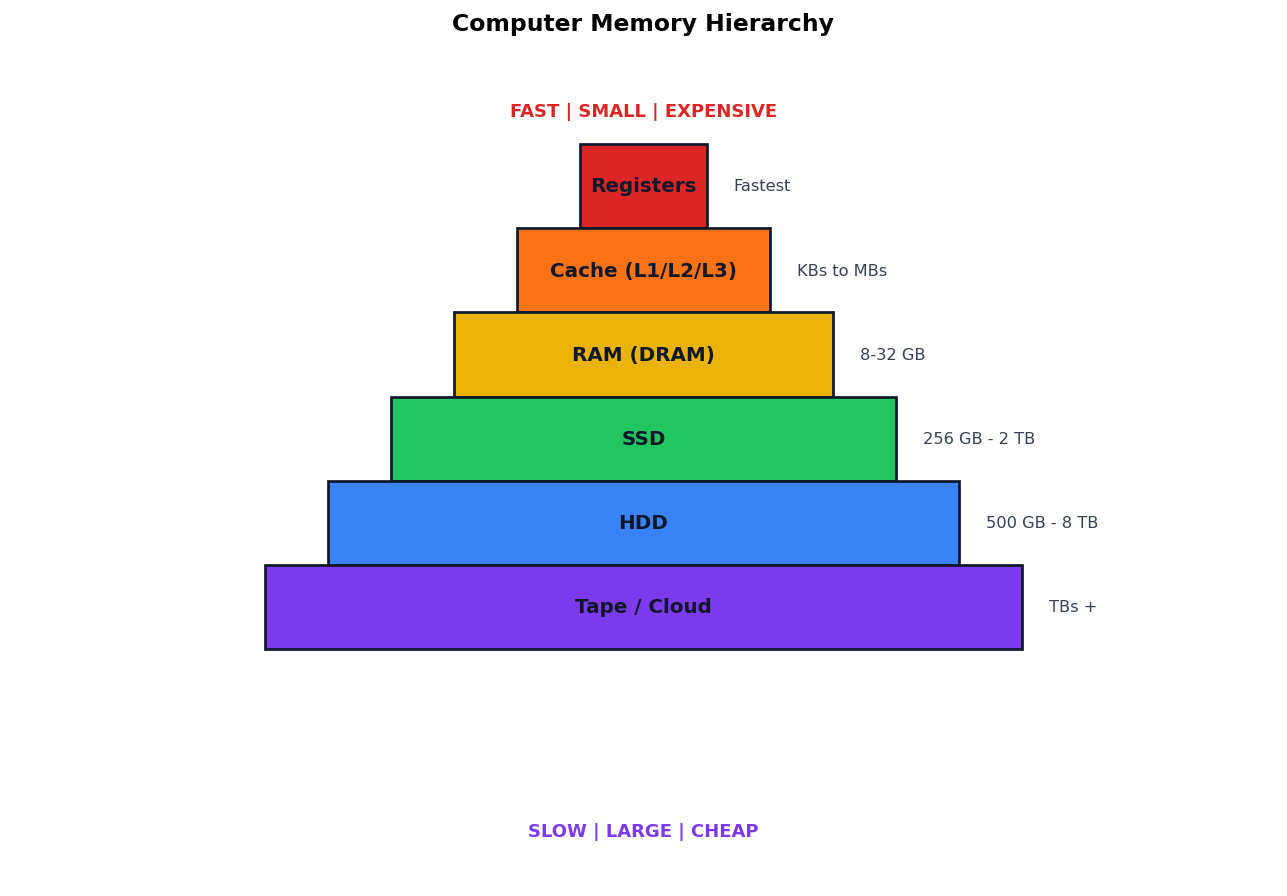
Study the memory hierarchy diagram and answer:
The fastest storage in the hierarchy is:
ARegisters
BCache
CRAM
DHDD
The volatile main memory is:
ARAM
BSSD
CHDD
DCache
Explain the memory hierarchy with respect to speed cost and volatility.
Show answersHide answers
1. Option 1 — Registers
2. Option 1 — RAM
3. Memory hierarchy goes from fastest+smallest+expensive at the top to slowest+largest+cheapest at the bottom. Volatile memories (registers cache RAM) lose contents when power is off; non-volatile (SSD HDD tape) retain it. Modern systems use a mix to balance speed and cost.