SUMMARY: The chapter "Computer Systems" in Class 11 Informatics Practices introduces students to the fundamental components and functions of computer systems. KEY TOPICS: hardware components, software types, operating systems, input and output devices, storage devices, computer memory, system software, application software, computer networks, data processing.
Which of the following is an example of system software?
AMS Word
BOperating System
CPhotoshop
DVLC Media Player
Check answerHide answer
Correct answer: Option 2 — Operating System
Q51 Mark
Which of the following converts source code into machine code line by line?
ACompiler
BInterpreter
CLinker
DAssembler
Check answerHide answer
Correct answer: Option 2 — Interpreter
Short Answer Questions5 questions
Q63 Marks
Differentiate between RAM and ROM.
Q73 Marks
Convert decimal 25 to binary.
Q83 Marks
Differentiate between system software and application software with examples.
Q93 Marks
Differentiate between compiler and interpreter.
Q103 Marks
Define operating system. List any two examples.
Long Answer Questions6 questions
Q116 Marks
Describe the basic components of a computer system with a block diagram.
Q126 Marks
Discuss the memory hierarchy in a computer system.
Q136 Marks
Discuss types of software with examples — system application and utility software.
Q146 Marks
Discuss any five functions of an operating system.
Q156 Marks
Convert decimal 156 to binary octal and hexadecimal showing the steps.
Q166 Marks
Differentiate between RAM and ROM in tabular form.
Assertion–Reason Questions5 questions
Q171 Mark
Assertion (A): Computers use binary number system.
Reason (R): Their digital circuits have only two stable states.
Show explanationHide explanation
Correct answer: Option 1 —
Both A and R are true, and R is the correct explanation of A.
Q181 Mark
Assertion (A): SSDs are faster than HDDs.
Reason (R): SSDs have no moving mechanical parts.
Show explanationHide explanation
Correct answer: Option 1 —
Both A and R are true, and R is the correct explanation of A.
Q191 Mark
Assertion (A): RAM is volatile memory.
Reason (R): Its contents are lost when power is switched off.
Show explanationHide explanation
Correct answer: Option 1 —
Both A and R are true, and R is the correct explanation of A.
Q201 Mark
Assertion (A): An operating system manages hardware and software resources.
Reason (R): It also acts as an interface between user and hardware.
Show explanationHide explanation
Correct answer: Option 1 —
Both A and R are true, and R is the correct explanation of A.
Q211 Mark
Assertion (A): A compiler translates the entire program before execution.
Reason (R): An interpreter translates and executes line by line.
Show explanationHide explanation
Correct answer: Option 1 —
Both A and R are true, and R is the correct explanation of A.
Statement-Based Questions5 questions
Q221 Mark
Statement 1: Hardware refers to the physical parts.
Statement 2: Software refers to the programs.
Show answerHide answer
Correct answer: Option 1 —
Both statements are true.
Q231 Mark
Statement 1: A bit is the smallest unit of information.
Statement 2: A byte consists of 8 bits.
Show answerHide answer
Correct answer: Option 1 —
Both statements are true.
Q241 Mark
Statement 1: GUI stands for Graphical User Interface.
Statement 2: CLI stands for Command Line Interface.
Show answerHide answer
Correct answer: Option 1 —
Both statements are true.
Q251 Mark
Statement 1: Linux is an open source operating system.
Statement 2: Its source code is freely available.
Show answerHide answer
Correct answer: Option 1 —
Both statements are true.
Q261 Mark
Statement 1: Cache is faster than RAM.
Statement 2: It bridges the speed gap between CPU and main memory.
Show answerHide answer
Correct answer: Option 1 —
Both statements are true.
Case Study / Passage Questions1 question
Q273 Marks
A small business owner is buying 5 desktops for her staff. The shop offers two configurations. Config A has 8 GB RAM 256 GB SSD i5 processor. Config B has 16 GB RAM 512 GB SSD i7 processor at 25 percent higher cost. The staff use MS Office email and a browser-based ERP.
Which configuration is more cost-effective for the workload described?
AConfig A
BConfig B
CBoth equal
DCannot decide
Which factor most directly affects how many programs can be open at once?
ARAM
BSSD
CCPU
DAll equally
Recommend a configuration and explain why each spec matters for the workload.
Show answersHide answers
1. Option 1 — Config A
2. Option 1 — RAM
3. Config A is sufficient for the workload (Office email browser ERP) and saves money. The owner can spend the savings on better monitors and keyboards. RAM is the most relevant spec because more RAM lets the OS keep more programs in memory without swapping. The CPU upgrade matters mainly for compute-heavy tasks like video editing or compiling code which the staff do not perform.
Table-Based Questions4 questions
Q286 Marks
Identify the type of memory and one feature for each example.
Memory
Type
Volatile?
RAM
?
Yes
ROM
?
No
Cache
?
?
Hard disk
Secondary
?
SSD
?
?
Q295 Marks
Convert decimal numbers to binary.
Decimal
Binary
5
?
10
?
25
?
50
?
100
?
Q305 Marks
Match each operating system with its category.
OS
Category
Windows
?
Linux
?
macOS
?
Android
?
iOS
?
Q315 Marks
Match each input device to its purpose.
Input device
Purpose
Keyboard
?
Mouse
?
Microphone
?
Scanner
?
Webcam
?
Touchscreen
?
Picture-Based Questions3 questions
Q323 Marks
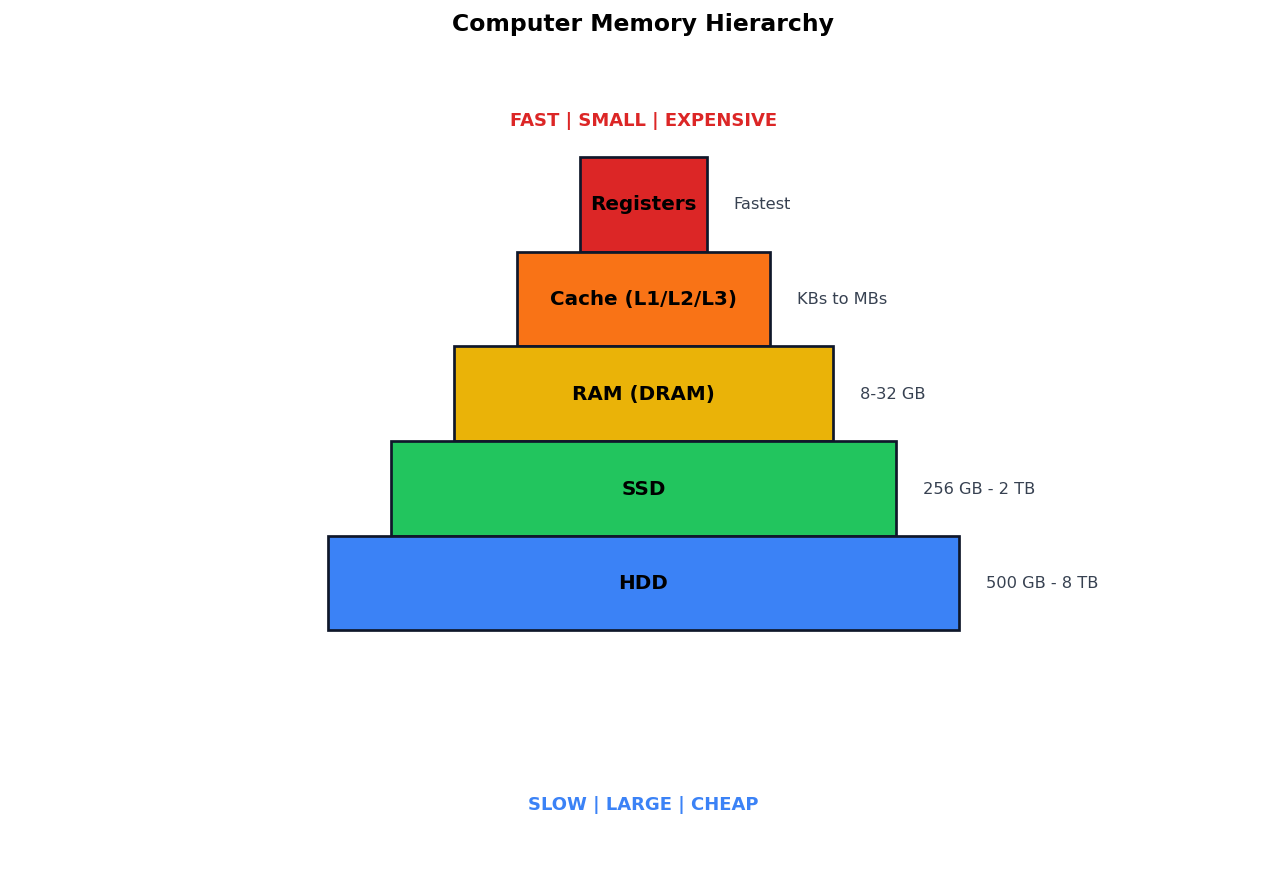
Study the memory hierarchy diagram and answer:
The fastest storage in the hierarchy is:
ARegisters
BCache
CRAM
DHDD
The volatile main memory is:
ARAM
BSSD
CHDD
DCache
Explain the memory hierarchy with respect to speed cost and volatility.
Show answersHide answers
1. Option 1 — Registers
2. Option 1 — RAM
3. Memory hierarchy goes from fastest+smallest+expensive at the top to slowest+largest+cheapest at the bottom. Volatile memories (registers cache RAM) lose contents when power is off; non-volatile (SSD HDD) retain it. Modern systems use a mix.
Q333 Marks
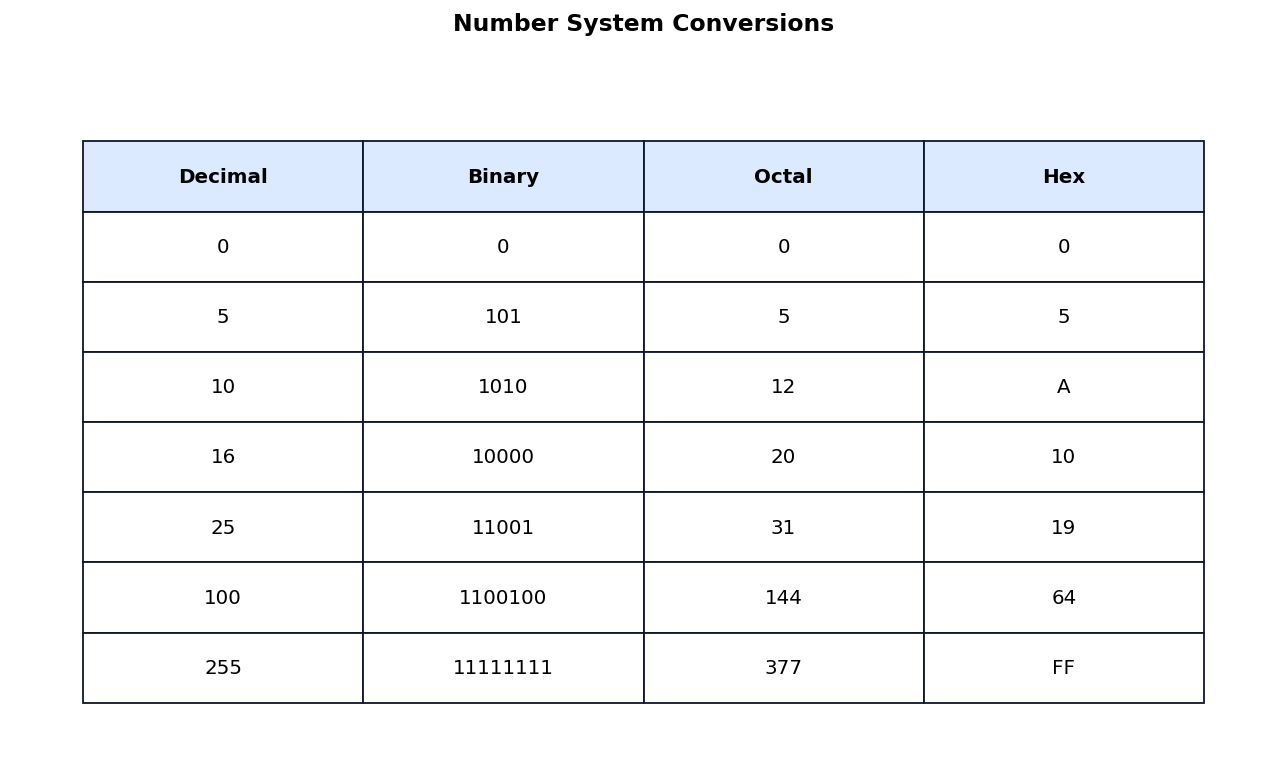
Study the number systems conversion table and answer:
Decimal 100 in hexadecimal is:
A64
B100
CFF
D377
Decimal 255 in binary is:
A11111111
B10000000
C11110000
D10101010
Explain why hexadecimal is preferred over binary for representing large numbers.
Show answersHide answers
1. Option 1 — 64
2. Option 1 — 11111111
3. Computers use binary internally because circuits have two stable states. Octal (base 8) and hexadecimal (base 16) are convenient shorthand because each octal digit = 3 binary bits and each hex digit = 4 binary bits. Hex is used for memory addresses colour codes and machine code.
Q343 Marks
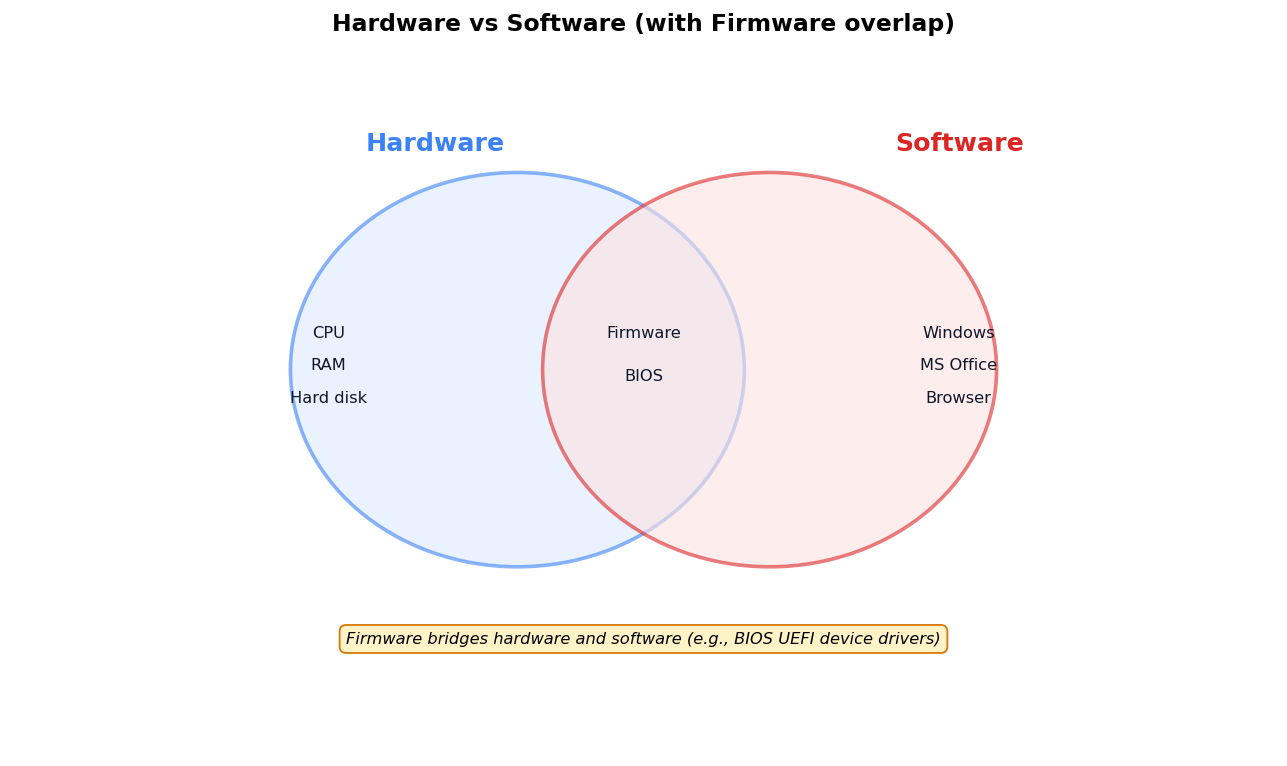
Study the hardware vs software Venn diagram and answer:
The category that bridges hardware and software is:
AHardware
BSoftware
CFirmware
DNetwork
MS Office is an example of:
AHardware
BSoftware
CFirmware
D
Differentiate between hardware software and firmware with examples.
Show answersHide answers
1. Option 3 — Firmware
2. Option 2 — Software
3. Hardware refers to physical components like CPU RAM hard disk and peripherals. Software refers to programs that run on hardware including operating systems and applications. Firmware is special software stored in hardware that bridges the two — examples include BIOS UEFI and device drivers.